1. 각 글자색을 랜덤하게 선택하여 "Hello World!"를 화면에 출력하는 프로그램을 작성하라.
코드
|
1
2
3
4
5
6
7
8
9
10
11
12
13
14
15
16
17
18
19
20
21
22
23
24
25
26
27
28
29
|
import java.awt.Color;
import java.awt.Graphics;
import javax.swing.JFrame;
import javax.swing.JPanel;
class Pro1Component extends JPanel {
public void paintComponent(Graphics g) {
Color color = new Color((int) (Math.random() * 255), (int) (Math.random() * 255), (int) (Math.random() * 255));
g.setColor(color);
g.drawString("Hello World!", 50, 50);
}
}
public class Programming1 {
public static void main(String[] args) {
JFrame frame = new JFrame();
frame.setSize(200, 200);
frame.setTitle("Programming1");
frame.setDefaultCloseOperation(JFrame.EXIT_ON_CLOSE);
JPanel panel = new Pro1Component();
frame.add(panel);
frame.setVisible(true);
}
}
|
cs |
실행결과

2. 폰트를 랜덤하게 선택하여서 "Hello World!"를 화면에 5줄 출력하는 프로그램을 작성하라.
코드
|
1
2
3
4
5
6
7
8
9
10
11
12
13
14
15
16
17
18
19
20
21
22
23
24
25
26
27
28
29
30
31
32
33
34
35
36
37
38
39
40
41
42
43
44
45
46
47
48
49
50
51
52
53
54
|
import java.awt.Font;
import java.awt.Graphics;
import javax.swing.JFrame;
import javax.swing.JPanel;
class Pro2Component extends JPanel {
Font f1, f2, f3, f4, f5;
public Pro2Component() {
f1 = new Font("Serif", Font.PLAIN, 20);
f2 = new Font("San Serif", Font.PLAIN, 20);
f3 = new Font("Dialog", Font.PLAIN, 20);
f4 = new Font("Monospaced", Font.PLAIN, 20);
f5 = new Font("Dialoginput", Font.PLAIN, 20);
}
public void paintComponent(Graphics g) {
int random = (int) (Math.random() * 5);
if (random == 1) {
g.setFont(f1);
g.drawString("Hello World!", 20, 20);
} else if (random == 2) {
g.setFont(f2);
g.drawString("Hello World!", 20, 20);
} else if (random == 3) {
g.setFont(f3);
g.drawString("Hello World!", 20, 20);
} else if (random == 4) {
g.setFont(f4);
g.drawString("Hello World!", 20, 20);
} else {
g.setFont(f5);
g.drawString("Hello World!", 20, 20);
}
}
}
public class Programming2 {
public static void main(String[] args) {
JFrame frame = new JFrame();
frame.setSize(200, 100);
frame.setTitle("Programming2");
frame.setDefaultCloseOperation(JFrame.EXIT_ON_CLOSE);
JPanel panel = new Pro2Component();
frame.add(panel);
frame.setVisible(true);
}
}
|
cs |
실행 결과

3. 원을 나타내는 Circle 클래스를 작성한다. Circle 클래스의 생성자에서는 색상, 반지름, 중심을 매개 변수로 받아서 지정된 위치에 원을 그린다. Circle 객체를 여러 개 생성하여서 화면의 랜덤한 위치에 원이 여러 개 나타나도록 하라.
코드
|
1
2
3
4
5
6
7
8
9
10
11
12
13
14
15
16
17
18
19
20
21
22
23
24
25
26
27
28
29
30
31
32
33
34
35
36
37
38
39
40
41
42
43
44
45
46
47
48
49
50
51
|
import java.awt.Color;
import java.awt.Graphics;
import javax.swing.JFrame;
import javax.swing.JPanel;
class Circle extends JPanel {
Circle circle;
Color color;
int radius;
int x;
int y;
public Circle(Color color, int radius, int x, int y) {
this.color = color;
this.radius = radius;
this.x = x;
this.y = y;
}
public void paintComponent(Graphics g) {
g.setColor(color);
g.fillOval(x - radius, y - radius, radius * 2, radius * 2);
}
}
public class Programming3 {
public static void main(String[] args) {
JFrame frame = new JFrame();
frame.setSize(500, 500);
frame.setTitle("Programming3");
frame.setDefaultCloseOperation(JFrame.EXIT_ON_CLOSE);
Circle circle1 = new Circle(Color.RED, 30, (int) (Math.random() * 500), (int) (Math.random() * 500));
frame.add(circle1);
Circle circle2 = new Circle(Color.YELLOW, 30, (int) (Math.random() * 500), (int) (Math.random() * 500));
frame.add(circle2);
Circle circle3 = new Circle(Color.GREEN, 30, (int) (Math.random() * 500), (int) (Math.random() * 500));
frame.add(circle3);
Circle circle4 = new Circle(Color.PINK, 30, (int) (Math.random() * 500), (int) (Math.random() * 500));
frame.add(circle4);
Circle circle5 = new Circle(Color.BLACK, 30, (int) (Math.random() * 500), (int) (Math.random() * 500));
frame.add(circle5);
frame.setVisible(true);
}
}
|
cs |
실행결과
error
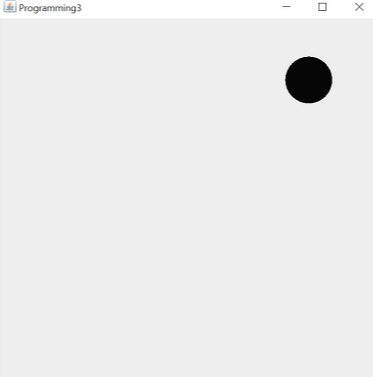
Circle이 랜덤으로 설정했던 좌표가... 좌표는 실행할 때마다 랜덤이지만 circle1,2,3,4,5 모두 한 좌표에서 동시에 그려지는 오류가 발생함.
paintComponent에 fillOval가 하나만 있어서 그런가 싶었는데, 분명히 객체가 전부 다를텐데 저게 공유되는 이유를 도저히 모르겠네요.
오류 해결
코드
|
1
2
3
4
5
6
7
8
9
10
11
12
13
14
15
16
17
18
19
20
21
22
23
24
25
26
27
28
29
30
31
32
33
34
35
36
37
38
39
40
41
42
43
44
45
46
47
48
49
50
51
52
53
54
55
56
57
58
59
60
61
62
63
64
|
import java.awt.Color;
import java.awt.Graphics;
import javax.swing.JFrame;
import javax.swing.JPanel;
class Circle {
Circle circle;
Color color;
int radius;
int x;
int y;
public Circle(Color color, int radius, int x, int y) {
this.color = color;
this.radius = radius;
this.x = x;
this.y = y;
}
}
class Pro3Panel extends JPanel {
Circle circle1, circle2, circle3, circle4, circle5;
public Pro3Panel() {
circle1 = new Circle(Color.RED, 30, (int) (Math.random() * 400), (int) (Math.random() * 400));
circle2 = new Circle(Color.YELLOW, 30, (int) (Math.random() * 400), (int) (Math.random() * 400));
circle3 = new Circle(Color.GREEN, 30, (int) (Math.random() * 400), (int) (Math.random() * 400));
circle4 = new Circle(Color.PINK, 30, (int) (Math.random() * 400), (int) (Math.random() * 400));
circle5 = new Circle(Color.BLACK, 30, (int) (Math.random() * 400), (int) (Math.random() * 400));
}
public void paintComponent(Graphics g) {
super.paintComponent(g);
g.setColor(circle1.color);
g.fillOval(circle1.x - circle1.radius, circle1.y - circle1.radius, circle1.radius * 2, circle1.radius * 2);
g.setColor(circle2.color);
g.fillOval(circle2.x - circle2.radius, circle2.y - circle2.radius, circle2.radius * 2, circle2.radius * 2);
g.setColor(circle3.color);
g.fillOval(circle3.x - circle3.radius, circle3.y - circle3.radius, circle3.radius * 2, circle3.radius * 2);
g.setColor(circle4.color);
g.fillOval(circle4.x - circle4.radius, circle4.y - circle4.radius, circle4.radius * 2, circle4.radius * 2);
g.setColor(circle5.color);
g.fillOval(circle5.x - circle5.radius, circle5.y - circle5.radius, circle5.radius * 2, circle5.radius * 2);
}
}
public class Programming3 {
public static void main(String[] args) {
JFrame frame = new JFrame();
frame.setSize(500, 500);
frame.setTitle("Programming3");
frame.setDefaultCloseOperation(JFrame.EXIT_ON_CLOSE);
Pro3Panel panel = new Pro3Panel();
frame.add(panel);
frame.setVisible(true);
}
}
|
cs |
실행 결과
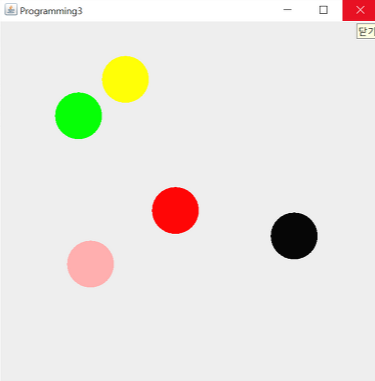
오류 해석
Circle 클래스는 매개변수를 받기만 하고, Panel 클래스를 새로 만들어 Circle클래스를 참조하였습니다.
// GUI 파트는 여기 까지 하겠습니다. 하다보니 GUI파트만 13부터 19파트 까지더라구요..
왜 GUI파트를 이렇게 많이 하나 싶네요..
다음 글부터는 CHPATER20 패키지부터 공부하면서 이어 작성하겠습니다.
'프로그래밍 > Java' 카테고리의 다른 글
| [POWER JAVA 2판] CHAPTER 20 LAB (0) | 2022.04.25 |
|---|---|
| [POWER JAVA 2판] CHAPTER 15 EXERCISE (0) | 2022.02.28 |
| [POWER JAVA 2판] CHAPTER 15 LAB (0) | 2022.02.27 |
| [POWER JAVA 2판] CHAPTER 14 PROGRAMMING (0) | 2022.02.22 |
| [POWER JAVA 2판] CHAPTER 14 EXERCISE (0) | 2022.02.22 |