1. BorderLayout을 사용하는 컨테이너에 여러 개의 버튼을 중앙에 배치하면 어떻게 되는가?
테스트 코드
|
1
2
3
4
5
6
7
8
9
10
11
12
13
14
15
16
17
18
19
20
21
22
23
24
25
26
27
|
import java.awt.BorderLayout;
import javax.swing.JButton;
import javax.swing.JFrame;
class MyFrame extends JFrame{
public MyFrame() {
setSize(300,200);
setDefaultCloseOperation(JFrame.EXIT_ON_CLOSE);
setTitle("EXERCISE1 TEST");
add(new JButton("Center1"), BorderLayout.CENTER);
add(new JButton("Center2"), BorderLayout.CENTER);
add(new JButton("Center3"), BorderLayout.CENTER);
add(new JButton("Center4"), BorderLayout.CENTER);
setVisible(true);
}
}
public class Exercise1 {
public static void main(String[] args) {
MyFrame f = new MyFrame();
}
}
|
cs |
실행 결과

전체 화면의 버튼이 씌워지면서 가장 마지막에 add()한 버튼이 가장 위로 출력된다.
2.각 컨테이너의 디폴트 배치 관리자는 무엇인지를 요약 정리하라.
| 컨테이너 | 디폴트 배치 관리자 |
| 프레임(frame) | BorderLayout (JApplet 또한 디폴트) |
| 패널(panel) | FlowLayout |
| 애플릿(applet) | FlowLayout |
교재 330p
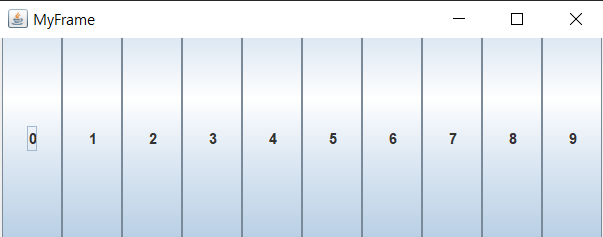
3.다음과 같이 버튼을 배치하기 위해서는 어떤 관리자를 어떻게 사용하여야 하는가? 다음의 빈칸을 채워라.
panel.setLayout(new );
GridLayout(0,10)
테스트 코드
|
1
2
3
4
5
6
7
8
9
10
11
12
13
14
15
16
17
18
19
20
21
22
23
24
25
26
27
28
29
30
31
32
33
|
import java.awt.GridLayout;
import javax.swing.JButton;
import javax.swing.JFrame;
import javax.swing.JPanel;
class MyFrame3 extends JFrame{
public MyFrame3() {
setSize(500,200);
setDefaultCloseOperation(JFrame.EXIT_ON_CLOSE);
setTitle("MyFrame");
JPanel panel = new JPanel();
panel.setLayout(new GridLayout(0,10));
JButton[] btarray = new JButton[10];
for (int i = 0 ; i<btarray.length;i++) {
btarray[i]= new JButton(""+i);
panel.add(btarray[i]);
}
add(panel);
setVisible(true);
}
}
public class Exercise3 {
public static void main(String[] args) {
MyFrame3 f = new MyFrame3();
}
}
|
cs |
실행결과
4. 다음과 같이 난수를 발생하여서 레이블을 불규칙하게 배치하여 보자. 어떤 배치 관리자를 어떻게 사용하여야 하는가? 참고로 절대 위치로 배치하려면 setBounds()를 사용하거나 setSize()와 setLocation()을 함께 사용한다. 또 난수는 Math.random()으로 발생시킨다. 다음 코드의 빈칸을 채워라.
cs
테스트 코드
|
1
2
3
4
5
6
7
8
9
10
11
12
13
14
15
16
17
18
19
20
21
22
23
24
25
26
27
28
29
30
31
32
33
34
35
36
37
38
39
40
|
import java.awt.Color;
import javax.swing.JFrame;
import javax.swing.JLabel;
import javax.swing.JPanel;
class MyFrame4 extends JFrame {
JLabel[] labels = new JLabel[30];
public MyFrame4() {
setSize(550, 300);
setDefaultCloseOperation(JFrame.EXIT_ON_CLOSE);
setTitle("Exercise4");
JPanel p = new JPanel();
p.setBackground(Color.YELLOW);
p.setLayout(null);
for (int i = 0; i < 30; i++) {
labels[i] = new JLabel("" + i);
int x = (int) (500 * Math.random());
int y = (int) (200 * Math.random());
labels[i].setForeground(Color.MAGENTA);
labels[i].setLocation(x, y);
labels[i].setSize(30, 30);
p.add(labels[i]);
}
add(p);
setVisible(true);
}
}
public class Exercise4 {
public static void main(String[] args) {
MyFrame4 f = new MyFrame4();
}
}
|
cs |
실행결과
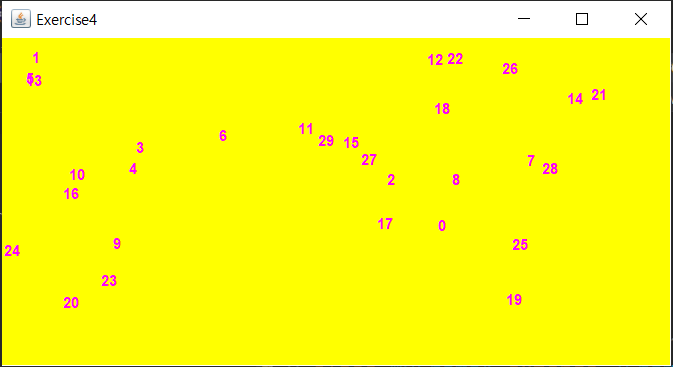
null
x, y
30, 30
'프로그래밍 > Java' 카테고리의 다른 글
| [POWER JAVA 2판] CHAPTER 15 LAB (0) | 2022.02.27 |
|---|---|
| [POWER JAVA 2판] CHAPTER 14 PROGRAMMING (0) | 2022.02.22 |
| [POWER JAVA 2판] CHAPTER 14 LAB (0) | 2022.02.22 |
| [POWER JAVA 2판] CHAPTER 13 PROGRAMMING (0) | 2022.02.21 |
| [POWER JAVA 2판] CHAPTER 13 EXERCISE (0) | 2022.02.21 |